
Refund
Discover Antom's refund rules and learn how to initiate a refund for a successful transaction.
Refund Rules
The following are the relevant refund rules:
- Commission fee: Whether the commission fee is returned or whether there are additional charges for the refund is subject to the contract.
- Refund settlement rate: When the settlement and payment currency are inconsistent, the settlement exchange rate used for refund is the Antom exchange rate on the day of the successful refund.
- Refund restriction: Different payment methods have different restrictions. The following are specific situations:
- Refund not supported
- Partial refund not supported
- Refunds are not supported after a certain time, starting from the time of successful payment.
For details, see Supported payment methods.
- Refund return: In extreme cases, due to the abnormal status of the user's bank account and other reasons, the refund API is called and returns a successful refund status, but the user is unable to receive the funds successfully. Antom will settle the corresponding funds and notify you through the financial report settlement. You need to decide how to handle the funds.
Refund methods
After the transaction is paid successfully, you can initiate a refund through the following two ways:
- Calling refund API: call the refund API to initiate a refund for a successfully paid transaction.
- Manual processing: Contact the Antom operator to make a refund in Antom Dashboard.
Workflow
The following figure is the workflow of refund.
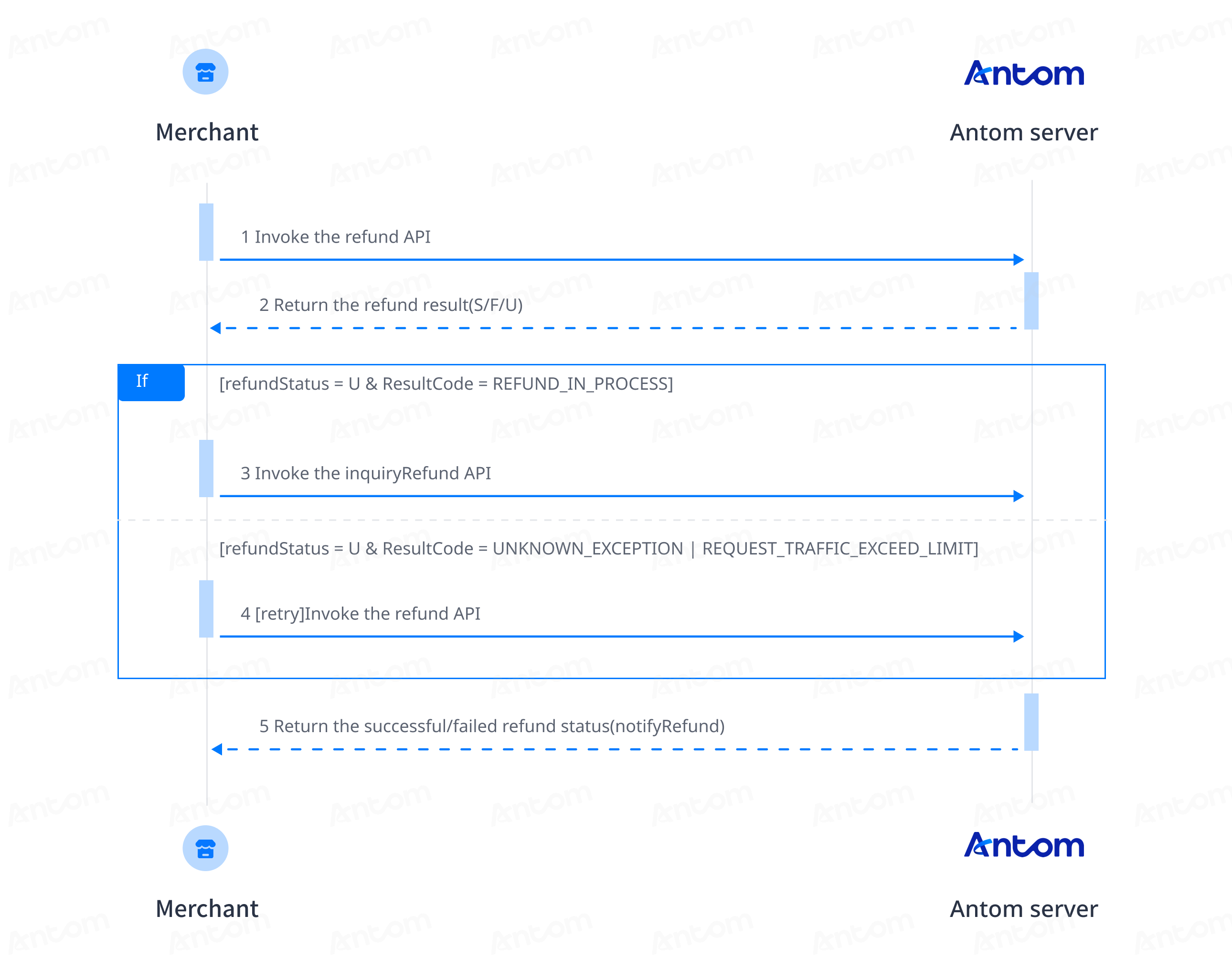
Notes:
- After calling the refund API, the following three situations may be returned:
- A refund failure is returned in the refund response: If the request parameters are incorrect, try to adjust the refund parameters based on the returned error code information and retry. Contact Antom Technical Support for troubleshooting. For details about how to handle each error code, see Error codes.
- A successful refund is returned in the refund response: The resultCode parameter returns
REFUND_IN_PROCESS, use the inquiryRefund API to obtain the final refund result, or wait for the refund result notification through notifyRefund.- An unknown exception of refund is returned in the refund response: It is usually due to network reasons, and you can try to retry without changing the account.
- Refund notification: A refund notification will be sent if the refund is successful. In the case of refund failure, there will be no refund notification if the processing is abnormal due to an illegal refund request.
Integration steps
Start your integration by taking the following steps:
- Initiate refund request
- Obtain refund result
Step 1: Initiate refund request
The refund API processing flow may be synchronous or asynchronous depending on the payment method:
- Synchronous refund: After calling the refund API, a response directly indicates whether the refund was successful or failed.
Note: There is a slight possibility of system exceptions or payment channel processing exceptions, which might result in different responses.
- Asynchronous Refund: After calling the refund API, a response indicates the refund is being processed. You can obtain the final result through the following methods:
- Receive asynchronous notifications.
- Actively query refund result.
Supported payment methods for sync/async refunds is as follows:
Synchronous refund | Asynchronous Refund |
All Alipay + payment methods | Other payment methods supported by asynchronous refund are asynchronous refund. Please refer to the supported payment methods for all payment methods. |
Mastercard and Visa cards when the acquiring mechanism is 2C2P HK and 2C2P SG |
Table 2. Supported payment methods for sync/async refunds
Call the refund API by specifying the following parameters:
Parameter type | Parameter name | Required | Description |
Base parameter | refundRequestId | Yes | The unique ID assigned by the merchant to identify a refund request. |
refundAmount.currency | Yes | The currency used for the corresponding payment of the refund. The value is a 3-letter currency code that follows the ISO 4217 standard. | |
refundAmount.value | Yes | The value of the amount as a positive integer in the smallest currency unit. For example, if the currency is USD and the amount is $1.00, set the value of this parameter to | |
paymentId | Yes | The unique ID assigned by Antom for the original payment to be refunded. |
Table 3. Key parameters
The following sample code shows how to call the refund API:
public static void refund() {
    AlipayRefundRequest alipayRefundRequest = new AlipayRefundRequest();
    // replace with your refundRequestId
    String refundRequestId = UUID.randomUUID().toString();
    alipayRefundRequest.setRefundRequestId(refundRequestId);
    alipayRefundRequest.setPaymentId("202505151940108001001889A0235440943");
    alipayRefundRequest.setRefundReason("demo refund");

    // set refund amount
    Amount amount = Amount.builder().currency("USD").value("1000").build();
    alipayRefundRequest.setRefundAmount(amount);

    AlipayRefundResponse alipayRefundResponse;
    try {
        alipayRefundResponse = CLIENT.execute(alipayRefundRequest);
    } catch (AlipayApiException e) {
        String errorMsg = e.getMessage();
        // handle error condition
    }
}
The following code shows a sample of the request message:
{
    "paymentId": "2024121219401080010018867021108****",
    "refundReason": "amsdemorefund",
    "refundRequestId": "yuqian_refund_654ac17e-bc5e-4648-b9de-a18f0a74****",
    "refundAmount": {
        "currency": "SGD",
        "value": "1000"
    }
}
The following conditions do not meet refund requirements. If the refund API is called, Antom will return corresponding error codes.
Description | Error code |
The payment is not successful. | ORDER_STATUS_INVALID |
| REFUND_WINDOW_EXCEED |
The payment method does not support canceling or refunding transactions. | PAYMENT_METHOD_NOT_SUPPORTED |
A partial refund is not supported for this transaction. | PARTIAL_REFUND_NOT_SUPPORTED |
The merchant balance is insufficient. | MERCHANT_BALANCE_NOT_ENOUGH |
Table 4. Error code
The following code shows a sample of the response message:
{
  "result": {
    "resultCode": "SUCCESS",
    "resultStatus": "S",
    "resultMessage": "Success"
  },
  "refundAmount": {
    "value": "100",
    "currency": "USD"
  },
  "refundTime": "2020-10-10T12:01:01+08:30",
  "paymentId": "20181129190741010007000000****",
  "refundRequestId": "20181129190741020007000000****",
  "refundId": "40181129190741020007000000****"
}
The table below displays the possible values returned in the resultStatus field of the refund response. Please follow the corresponding instructions for handling:
result.resultStatus | Message | Suggestion |
S | The refund is successful. | No further action is required. |
F | The refund failed. | Retry with a new refundRequestId or contact Antom technical support. |
U | The refund failed due to an unknown reason. | The following scenarios may occur:
|
Table 5. Possible values returned in the result.resultStatus
Step 2: Obtain refund result
When you initiate a refund request, you may obtain the refund result through the following methods:
- Receive asynchronous notification: Receive refund results from Antom server.
- Actively query refund result: Call the inquiryRefund API to obtain the refund result.
- Set up the Webhook URL to receive notifications:
Asynchronous notifications will be sent after a refund is initiated by default. However, in cases of partial failures such as parameter exceptions, the refund API will synchronously return F and no asynchronous notification will be sent. In such cases, the refund can be directly considered failed. You can choose one of the following two methods to set up the Webhook URL for receiving notifications:
- Order-level notification configuration Recommended: Specify an independent notification URL for each order through the refundNotifyUrl field in the refund API request.
- Merchant-level notification configuration: Log in to Antom Dashboard > Developer > Notification URL and add a notification URL for the alipay.ams.payments.refundnotify interface. For specific operations, please refer to Notification URL.
Below is a code example for asynchronous notification request of the refund result:
{
    "notifyType": "REFUND_RESULT",
    "refundAmount": {
        "currency": "USD",
        "value": "1000"
    },
    "refundId": "20241212194010801300188670203854640",
    "refundRequestId": "yuqian_refund_654ac17e-bc5e-4648-b9de-a18f0a74aa2a",
    "refundStatus": "SUCCESS",
    "refundTime": "2024-12-11T23:37:33-08:00",
    "result": {
        "resultCode": "SUCCESS",
        "resultMessage": "success.",
        "resultStatus": "S"
    }
}
The table below displays the possible values returned in the resultStatus field of the refund response. Please follow the corresponding instructions for handling:
result.resultStatus | Message | Suggestion |
| The refund is successful. | No further action is required. |
| The refund failed. | Retry with a new refundRequestId or contact Antom Technical Support. |
- The result notification sent by Antom is signed by Antom, it is recommended that you verify the signature to confirm that the notification was sent by Antom. Refer to the following code example to check the notification:
/**
 * receive notify
 *
 * @param request    request
 * @param notifyBody notify body
 * @return Result
 */
@PostMapping("/receiveNotify")
@ResponseBody
public Result receiveNotify(HttpServletRequest request, @RequestBody String notifyBody) {
    // retrieve the required parameters from http request
    String requestUri = request.getRequestURI();
    String requestMethod = request.getMethod();

    // retrieve the required parameters from request header
    String requestTime = request.getHeader("request-time");
    String clientId = request.getHeader("client-id");
    String signature = request.getHeader("signature");

    try {
        // verify the signature of notification
        boolean verifyResult = WebhookTool.checkSignature(requestUri, requestMethod, clientId,
                requestTime, signature, notifyBody, ANTOM_PUBLIC_KEY);
        if (!verifyResult) {
            throw new RuntimeException("Invalid notify signature");
        }

        // deserialize the notification body
        JSONObject jsonObject = JSON.parseObject(notifyBody);
        String notifyType = (String)jsonObject.get("notifyType");
        if("REFUND_RESULT".equals(notifyType)){
            AlipayRefundNotify paymentNotify = jsonObject.toJavaObject(AlipayRefundNotify.class);
            if (paymentNotify != null && "SUCCESS".equals(paymentNotify.getResult().getResultCode())) {
                // handle your own business logic.
                // e.g. The relationship between payment information and users is kept in the database.
                System.out.println("receive payment notify: " + JSON.toJSONString(paymentNotify));
                return Result.builder().resultCode("SUCCESS").resultMessage("success.").resultStatus(ResultStatusType.S).build();
            }
        }
        // other types of notifications

    } catch (Exception e) {
        // handle error condition
        return Result.builder().resultCode("FAIL").resultMessage("fail.").resultStatus(ResultStatusType.F).build();
    }

    return Result.builder().resultCode("SYSTEM_ERROR").resultMessage("system error.").resultStatus(ResultStatusType.F).build();
}- After receiving the notification, you are not required to sign the response, but must reply to every notification request in the following standardized format, regardless of whether the refund was successful or not.
{
  "result": {
    "resultCode": "SUCCESS",
    "resultStatus": "S",
    "resultMessage": "success"
  }
}Common questions
Q: Will the refund result be returned immediately after initiating a refund?
A: The final refund result may not be returned synchronously for all payment methods, so please refer to the asynchronous notification for the confirmed refund status.
Q: How long does it take for the buyer to receive the refund after it is successfully processed?
A: Receiving a successful refund notification only indicates that the card issuer has accepted the refund request. The actual refund processing time depends on the card-issuing bank.