
Sign a request and verify the signature
Before you begin, refer to the API foundation document to gain a basic understanding of the Antom message structure.
To ensure the authenticity and integrity of data after transmission, Antom requires all requests to be signed and the signatures to be verified:
- When calling an API, you must sign the request sent to Antom and verify the Antom response signature accordingly. For more information, see Call an API.
- When receiving a notification, you must verify the Antom request signature. However, you do not need to sign the response for the notification. For more information, see Receive a notification.
Call an API
Prerequisite
Ensure that you have generated a pair of asymmetric public and private keys on the Antom Dashboard. For more information, see Generate keys.
Sign a request
The following figure shows how to sign a request:
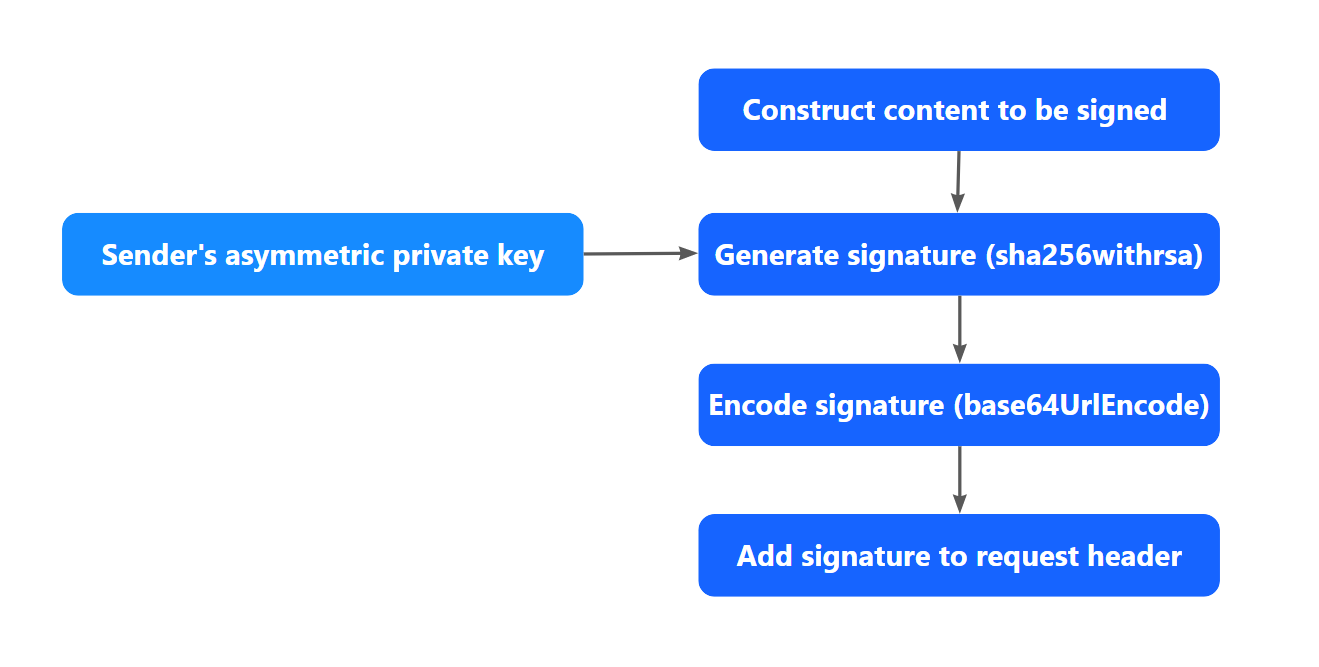
Figure 1. How to sign a request
Step 1: Construct the content to be signed
The syntax of content_to_be_signed is as follows:
<http-method> <http-uri>
<client-id>.<request-time>.<request-body>Note: there should be a space character between <http-method> and <http-uri>.
http-method: HTTP Request Method. It's alwaysPOST.http-uri: including Path to Resource and Parameters (If have). For example, if the HTTP URL is https://open-na-global.alipay.com/ams/api/v1/payments/pay, this field is/ams/api/v1/payments/pay.client-id: this param is required in Request Header and is used to identify a client. An example value isSANDBOX_5X00000000000000.request-time: this param is required in Request Header and it specifies the timestamp of when a request is sent. The value of this field must be accurate to milliseconds. An example value is1685599933871.request-body: HTTP Request Body. See the example code below:
{
    "env": {
        "terminalType": "WEB"
    },
    "order": {
        "orderAmount": {
            "currency": "CNY",
            "value": "100"
        },
        "orderDescription": "Testing order",
        "referenceOrderId": "ORDER_ID_1685599933871"
    },
    "paymentAmount": {
        "currency": "CNY",
        "value": "100"
    },
    "paymentMethod": {
        "paymentMethodType": "ALIPAY_CN"
    },
    "paymentRedirectUrl": "https://www.example.com",
    "paymentRequestId": "REQUEST_ID_1685599933871",
    "productCode": "CASHIER_PAYMENT"
}By complying with the syntax of content_to_be_signed, the request body above is constructed as follows:
POST /ams/api/v1/payments/pay
SANDBOX_5X00000000000000.1685599933871.{
    "env": {
        "terminalType": "WEB"
    },
    "order": {
        "orderAmount": {
            "currency": "CNY",
            "value": "100"
        },
        "orderDescription": "Testing order",
        "referenceOrderId": "ORDER_ID_1685599933871"
    },
    "paymentAmount": {
        "currency": "CNY",
        "value": "100"
    },
    "paymentMethod": {
        "paymentMethodType": "ALIPAY_CN"
    },
    "paymentRedirectUrl": "https://www.example.com",
    "paymentRequestId": "REQUEST_ID_1685599933871",
    "productCode": "CASHIER_PAYMENT"
}
Step 2: Generate the signature
The syntax of generating the signature is as follows:
generated_signature=urlEncode(base64Encode(sha256withRSA(<content_to_be_signed>, <privateKey>)))generated_signature: the generated signature string.urlEncode: the method to encode the base64 encoded digital signature.base64Encode: the method to encode the generated digital signature.sha256withrsa: the method to generate a digital signature for the provided content.content_to_be_signed: the content obtained from Step 1.privateKey: the private key value obtained from Prerequisite.
An example of a generated signature is as follows:
SVCvBbh5Eviwaj13ouTDy%2FAqFcNDNLXtoIgxFurTgnYjfBJ6h7jl4GKr%2Bkw8easQv9EHK7CXT9QZOMrkYNOUuqRs%2FDtT4vROCiRcnqNOKVjU3zHt%2Br%2Fxal%2FYRV4dc%2FNtu1ppyWJ6a2xNFCa63Y2YKNn%2FW%2B9eABmU2oohVXwBNoCnaLDoTIJV2RKb3E%2FiUp0aIWUz0Ntv4kVR8ZqMe6DUmf7pHRq9hm2av4wwBpJbHC%2B6R%2BMBQPv%2F0ZUFBW02ie%2FTpXBrPasb15s%2FjcmRpAnmED%2FFIec4TGzDIHr%2BO3QFtIRu72vg4zHWC3FuL4i8zfMXWNi3kp7hBFUIBpYroTZH5Q%3D%3DThe following code sample shows how to use Java to sign a request:
import java.net.URLEncoder;
import java.nio.charset.StandardCharsets;
import java.security.KeyFactory;
import java.security.PrivateKey;
import java.security.spec.PKCS8EncodedKeySpec;
import java.util.Base64;

public class SignatureSampleCode {

    /**
     * your private key, used to sign
     * please ensure the secure storage of your private keys to prevent leakage
     */
    private static final String CLIENT_PRIVATE_KEY = "";

    /**
     * you clientId
     */
    private static final String CLIENT_ID = "";

    /**
     * @param requestURI  domain part excluded, sample: /ams/api/v1/payments/pay
     * @param clientId    your clientId, sample: SANDBOX_5X00000000000000
     * @param requestTime timestamp in milliseconds, sample: 1685599933871
     * @param privateKey  your private key
     * @param requestBody request body
     * @return
     */
    public static String sign(String requestURI, String clientId, String requestTime, String privateKey, String requestBody) {

        // content_to_be_signed
        String contentToBeSigned = String.format("POST %s\n%s.%s.%s", requestURI, clientId, requestTime, requestBody);

        try {
            // sha256withRSA
            java.security.Signature signature = java.security.Signature.getInstance("SHA256withRSA");

            // privateKey
            PrivateKey priKey = KeyFactory.getInstance("RSA").generatePrivate(
                    new PKCS8EncodedKeySpec(Base64.getDecoder().decode(privateKey.getBytes(StandardCharsets.UTF_8))));

            signature.initSign(priKey);
            signature.update(contentToBeSigned.getBytes(StandardCharsets.UTF_8));

            // sign
            byte[] signed = signature.sign();

            // base64Encode
            String base64EncodedSignature = new String(Base64.getEncoder().encode(signed), StandardCharsets.UTF_8);

            // urlEncode
            return URLEncoder.encode(base64EncodedSignature, StandardCharsets.UTF_8.displayName());
        } catch (Exception e) {
            throw new RuntimeException(e);
        }
    }

    public static void main(String[] args) {
        System.out.println(sign("/ams/api/v1/payments/pay", CLIENT_ID, "1685599933871", CLIENT_PRIVATE_KEY, "{\n" +
                "    \"env\": {\n" +
                "        \"terminalType\": \"WEB\"\n" +
                "    },\n" +
                "    \"order\": {\n" +
                "        \"orderAmount\": {\n" +
                "            \"currency\": \"CNY\",\n" +
                "            \"value\": \"100\"\n" +
                "        },\n" +
                "        \"orderDescription\": \"Testing order\",\n" +
                "        \"referenceOrderId\": \"ORDER_ID_1685599933871\"\n" +
                "    },\n" +
                "    \"paymentAmount\": {\n" +
                "        \"currency\": \"CNY\",\n" +
                "        \"value\": \"100\"\n" +
                "    },\n" +
                "    \"paymentMethod\": {\n" +
                "        \"paymentMethodType\": \"ALIPAY_CN\"\n" +
                "    },\n" +
                "    \"paymentRedirectUrl\": \"https://www.example.com\",\n" +
                "    \"paymentRequestId\": \"REQUEST_ID_1685599933871\",\n" +
                "    \"productCode\": \"CASHIER_PAYMENT\"\n" +
                "}"));
    }

}
Step 3: Add the generated signature to the request header
- Assemble a signature string based on the following syntax:
'Signature: algorithm=<algorithm>, keyVersion=<key-version>, signature=<generatedSignature>'algorithm,keyVersion: see the header of the Message structure chapter.generatedSignature: the signature generated in Step 2.
For example:
'Signature: algorithm=RSA256, keyVersion=1, signature=SVCvBbh5Eviwaj13ouTDy%2FAqFcNDNLXtoIgxFurTgnYjfBJ6h7jl4GKr%2Bkw8easQv9EHK7CXT9QZOMrkYNOUuqRs%2FDtT4vROCiRcnqNOKVjU3zHt%2Br%2Fxal%2FYRV4dc%2FNtu1ppyWJ6a2xNFCa63Y2YKNn%2FW%2B9eABmU2oohVXwBNoCnaLDoTIJV2RKb3E%2FiUp0aIWUz0Ntv4kVR8ZqMe6DUmf7pHRq9hm2av4wwBpJbHC%2B6R%2BMBQPv%2F0ZUFBW02ie%2FTpXBrPasb15s%2FjcmRpAnmED%2FFIec4TGzDIHr%2BO3QFtIRu72vg4zHWC3FuL4i8zfMXWNi3kp7hBFUIBpYroTZH5Q%3D%3D'- Add the signature string to the request header. For details about the request header, see the Message structure chapter.
Send a request
Construct a request by adding the Client-Id, Request-Time, and Signature properties to the request header. After a request is constructed, you can use common tools, such as cURL or Postman to send the request. In the following example, cURL is used:
curl -X POST \
  https://open-na-global.alipay.com/ams/api/v1/payments/pay \
  -H 'Content-Type: application/json' \
  -H 'Client-Id: SANDBOX_5X00000000000000' \
  -H 'Request-Time: 1685599933871' \
  -H 'Signature: algorithm=RSA256, keyVersion=1, signature=SVCvBbh5Eviwaj13ouTDy%2FAqFcNDNLXtoIgxFurTgnYjfBJ6h7jl4GKr%2Bkw8easQv9EHK7CXT9QZOMrkYNOUuqRs%2FDtT4vROCiRcnqNOKVjU3zHt%2Br%2Fxal%2FYRV4dc%2FNtu1ppyWJ6a2xNFCa63Y2YKNn%2FW%2B9eABmU2oohVXwBNoCnaLDoTIJV2RKb3E%2FiUp0aIWUz0Ntv4kVR8ZqMe6DUmf7pHRq9hm2av4wwBpJbHC%2B6R%2BMBQPv%2F0ZUFBW02ie%2FTpXBrPasb15s%2FjcmRpAnmED%2FFIec4TGzDIHr%2BO3QFtIRu72vg4zHWC3FuL4i8zfMXWNi3kp7hBFUIBpYroTZH5Q%3D%3D' \
  -d '{
    "env": {
        "terminalType": "WEB"
    },
    "order": {
        "orderAmount": {
            "currency": "CNY",
            "value": "100"
        },
        "orderDescription": "Testing order",
        "referenceOrderId": "ORDER_ID_1685599933871"
    },
    "paymentAmount": {
        "currency": "CNY",
        "value": "100"
    },
    "paymentMethod": {
        "paymentMethodType": "ALIPAY_CN"
    },
    "paymentRedirectUrl": "https://www.example.com",
    "paymentRequestId": "REQUEST_ID_1685599933871",
    "productCode": "CASHIER_PAYMENT"
}'
Handle a response
After receiving a response from Antom, verify the signature of the response. The following figure shows how to verify a signature:
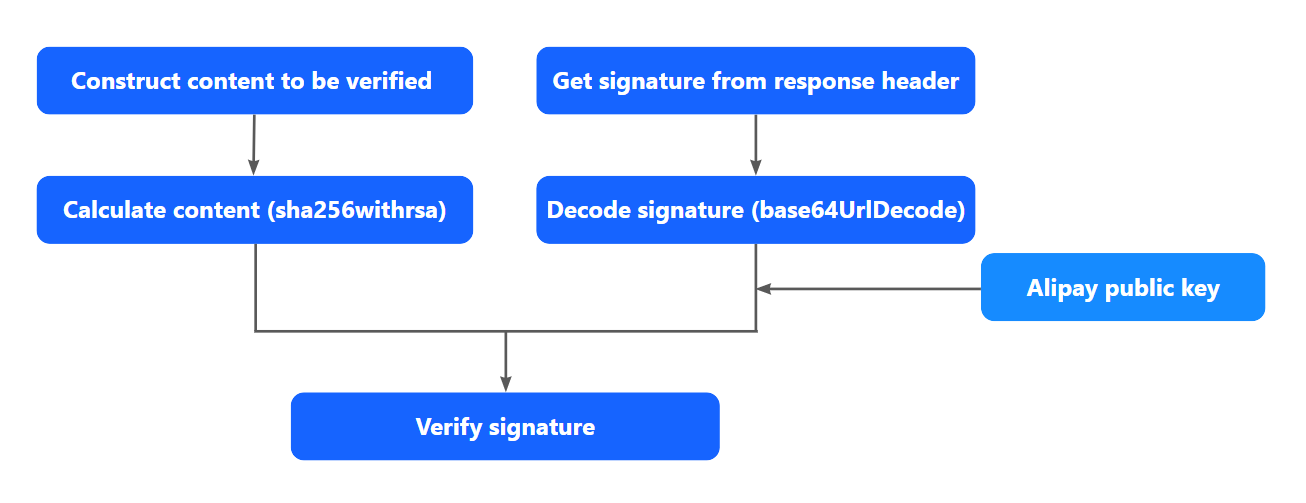
Figure 2. How to verify a signature
A response consists of the response header and the response body. For example:
- Code sample of the response header:
Client-Id: SANDBOX_5X00000000000000
Response-Time: 2019-05-28T12:12:14+08:00
algorithm=RSA256,keyVersion=1,signature=d1jdwMNkno7eOFqbsmCl2lfnmAUlK40VyHi3%2FlIrto%2FdV%2F1Ds730bfNJc9YrqNzjfb3ly66bhF0vlxgaPPwYqsWmc3FSXqSQGdSZ42VOzoZXBA2sjI0e%2F8e7IIa%2FGlrzbpNwrOiMuJxaUw6lIK7vxxyvr8vxpfQ0Pml0mKnQO2NP4yY%2BvMMJCdvmM3Bl7mNYL%2BVCLDMNespD763EY252vqMU8fbC9CUf2zCckN78TaWOuK%2FOiMlVYN8VUYIKeoyutiNUv%2B0vIiqfq7IcXCS0pom33MltFukhiyHIso3B%2FD1KN9fi0B9eJbXPB5ox%2FLsChGS48rQECRiqo2mC%2FHXzyQ%3D%3D- Code sample of the response body:
{
    "result": {
        "resultCode": "SUCCESS",
        "resultStatus": "S",
        "resultMessage": "success"
    }
}
The following steps demonstrate how to handle a response from Antom by using the examples above.
Step 1: Obtain Antom public key
Obtain the Antom public key through Antom Dashboard > Developer > Quick start > Integration resources and tools > Integration resources.
Note: Only when you upload your asymmetric public key to Antom Dashboard, can you obtain the Antom public key used to verify the corresponding response from Antom.
Step 2: Construct the content to be verified
The syntax of content_to_be_validated is as follows:
<http-method> <http-uri>
<client-id>.<response-time>.<response-body>http-method: HTTP Request Method. It's alwaysPOST.http-uri: including Path to Resource and Parameters (If have). For example, if the HTTP URL is https://open-na-global.alipay.com/ams/api/v1/payments/pay, this field is/ams/api/v1/payments/pay.client-id: this param is returned in Response Header and is used to identify a client. An example value isSANDBOX_5X00000000000000.response-time: this param is returned in Response Header and it specifies the time when a response is returned. The format of this param is as defined by ISO 8601. An example value is2019-05-28T12:12:14+08:00.response-body: HTTP Response Body.
By complying with the syntax of content_to_be_validated, construct the response given above as follows:
POST /ams/api/v1/payments/pay
SANDBOX_5X00000000000000.2019-05-28T12:12:14+08:00.{
 "result": {
    "resultCode":"SUCCESS",
    "resultStatus":"S",
    "resultMessage":"success"
   }
}
Step 3: Get the signature from the response header
The target signature string (target_signature) can be extracted from the Signature header in the response header. For details about the response header, see Message structure.
Code sample of Signature: Signature: algorithm=RSA256,keyVersion=1,signature=<target_signature>
Step 4: Verify the signature
The syntax of validating the signature is as follows:
is_signature_validate=sha256withRSA_verify(base64Decode(urlDecode(<target_signature>), <content_to_be_validated>, <serverPublicKey>))is_signature_validate: a Boolean value that specifies whether the signature is valid.
- true: the signature is valid.
- false: the signature is not valid. The cause can be a mismatch between the private key and public key, or
content_to_be_validatedis not correctly constructed.
sha256withRSA_verify: the method to verify the signature.base64Decode: the method to decode the digital signature.urlDecode: the method to decode the base64 decoded digital signature.target_signature: the target signature obtained from step 3.content_to_be_validated: the content to be verified, created from step 2.serverPublicKey: the Antom public key obtained from step 1.
The following sample code shows how to use Java to verify the signature:
import java.net.URLDecoder;
import java.nio.charset.StandardCharsets;
import java.security.KeyFactory;
import java.security.PublicKey;
import java.security.spec.X509EncodedKeySpec;
import java.util.Base64;

import org.apache.commons.lang3.StringUtils;

public class SignatureSampleCode {

    /**
     * alipay public key, used to verify signature
     */
    private static final String SERVER_PUBLIC_KEY = "";

    /**
     * you clientId
     */
    private static final String CLIENT_ID = "";

    /**
     * @param requestURI      domain part excluded, sample: /ams/api/v1/payments/pay
     * @param clientId        your clientId, sample: SANDBOX_5X00000000000000
     * @param responseTime    formated time as defined by ISO 8601, sample: 2019-05-28T12:12:14+08:00
     * @param alipayPublicKey alipay public key
     * @param responseBody    response body
     * @param targetSignature signature to be verified
     * @return
     */
    public static boolean verify(String requestURI, String clientId, String responseTime, String alipayPublicKey, String responseBody, String targetSignature) {

        // targetSignature would not be present in the response when AMS returns a SIGNATURE_INVALID
        if (StringUtils.isBlank(targetSignature)) {
            return false;
        }

        // content_to_be_validated
        String contentToBeValidated = String.format("POST %s\n%s.%s.%s", requestURI, clientId, responseTime, responseBody);

        try {
            // sha256withRSA
            java.security.Signature signature = java.security.Signature.getInstance("SHA256withRSA");

            // alipay public key
            PublicKey pubKey = KeyFactory.getInstance("RSA").generatePublic(
                    new X509EncodedKeySpec(Base64.getDecoder().decode(alipayPublicKey.getBytes(StandardCharsets.UTF_8))));

            signature.initVerify(pubKey);
            signature.update(contentToBeValidated.getBytes(StandardCharsets.UTF_8));

            // urlDecode
            String urlDecodedSignature = URLDecoder.decode(targetSignature, StandardCharsets.UTF_8.displayName());

            // base64Decode
            byte[] signatureToBeVerified = Base64.getDecoder().decode(urlDecodedSignature);

            // verify
            return signature.verify(signatureToBeVerified);

        } catch (Exception e) {
            throw new RuntimeException(e);
        }
    }

    public static void main(String[] args) {
        System.out.println(verify("/ams/api/v1/payments/pay", CLIENT_ID, "2019-05-28T12:12:14+08:00", SERVER_PUBLIC_KEY, "{\"result\":{\"resultStatus\":\"S\",\"resultCode\":\"SUCCESS\",\"resultMessage\":\"success.\"}}", "d1jdwMNkno7eOFqbsmCl2lfnmAUlK40VyHi3%2FlIrto%2FdV%2F1Ds730bfNJc9YrqNzjfb3ly66bhF0vlxgaPPwYqsWmc3FSXqSQGdSZ42VOzoZXBA2sjI0e%2F8e7IIa%2FGlrzbpNwrOiMuJxaUw6lIK7vxxyvr8vxpfQ0Pml0mKnQO2NP4yY%2BvMMJCdvmM3Bl7mNYL%2BVCLDMNespD763EY252vqMU8fbC9CUf2zCckN78TaWOuK%2FOiMlVYN8VUYIKeoyutiNUv%2B0vIiqfq7IcXCS0pom33MltFukhiyHIso3B%2FD1KN9fi0B9eJbXPB5ox%2FLsChGS48rQECRiqo2mC%2FHXzyQ%3D%3D"));
    }

}
Receive a notification
Handle a request
After receiving a notification from Antom, verify the signature of the request. The process of verifying the request signature is similar to the process introduced in the Handle a response section. To verify the signature, follow these steps:
- Obtain the Antom public key for the request to verify the signature.
- Construct the request to be verified by complying with the syntax of
content_to_be_validated:
<http-method> <http-uri>
<client-id>.<response-time>.<response-body>- Get the signature from the request header.
- Verify the signature.